Platform Updates
Platform Updates
Platform Updates
12
12
12
min
min
min
Dominic Valerio
Dominic Valerio
Vekta API Live for Coaches: From a Problem to a Workflow
Vekta API Live for Coaches: From a Problem to a Workflow
How to turn the repeat work in your coaching into AI workflows that run your way, every day. The full session, the slides and the method, step by step.
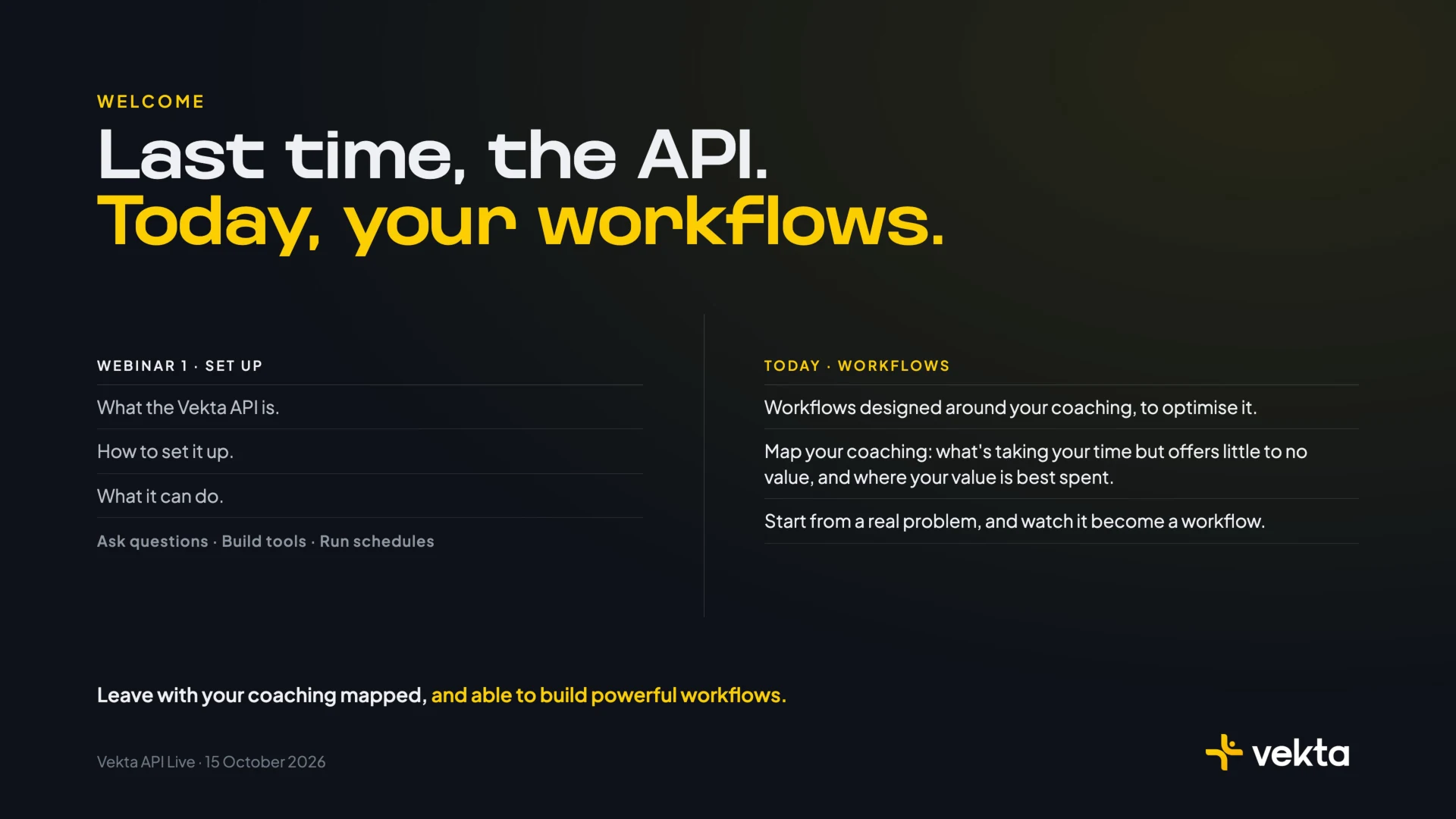
On Thursday 15 October we ran the second Vekta API Live, this time for coaches. The first session showed what the API can do. This one was about how to make it work for you, every day, the way you coach.
The answer is a workflow. Most coaches who use AI ask it questions, and some have built a tool or two. A workflow is different. It’s your method, written down clearly enough that AI can run it for you, on every athlete, every morning, and stop wherever your judgement is needed.
This write-up is for coaches who want to build their own. It takes you through the method step by step, using the workflow we built live as the example. The full session and the slides are below if you’d rather watch.
Want access to the Vekta API? Request your key or start your 14-day free trial
Jump to a Section
00:00 - Welcome
01:25 - You can do things AI will never do
03:11 - An automated workflow, in five parts
04:41 - How Vekta runs on workflows
07:44 - Two questions about your week
08:15 - Every workflow starts with a prompt
11:58 - Building one workflow, live
15:33 - The interview
22:15 - The plan, in five parts
23:25 - Two ways to run it
25:11 - The Early Warning page
32:25 - Three tips
36:17 - Every coach wants a different screen
37:44 - What comes next
Every slide from the session. Use the arrows, swipe on a phone, or open it full screen.
Why Workflows
We opened with a line most coaches recognise: “I know what every athlete needs from me. I don’t have the hours to give it to all of them.” A file goes unread. A warning sign is caught too late. A plan isn’t adjusted in time. Each time, an athlete’s performance pays for it.
AI can help with that, but how you use it matters. Asking a question helps once. You ask, it answers, and tomorrow you start again. Building a tool helps more, but a tool still waits for you to open it. A workflow does the work before you ask. It starts on its own, pulls the data, applies your rules and brings you only the decisions that need you.
For a coach, that changes three things:
Consistency. Your method is applied to every athlete, every day, including the ones you would have reached on Thursday.
Time. The reading, sorting and drafting is done before you sit down. Your hours go on the athletes.
Scale. Ten athletes or seventy, the workflow reads them all the same way.
What Only You Can Do
None of this replaces the coach. Some of the work is yours alone: understanding the athlete, the conversation and the trust, the judgement that comes from your knowledge, your expertise and your methodology, and deciding what happens next.
The rest, AI can do in a fraction of the time. Vekta already aggregates every ride from every athlete, rebuilds each athlete’s CP, W′ and zones from their riding, and learns their baselines. Through the API, an assistant can read every comment, note and check-in your athletes write, and write back into Vekta across your whole roster. A good workflow is designed around that line. The machine does the volume. The final call stays yours.

The Five Parts of a Workflow
Every workflow, in any business, has the same five parts. Know them, and you can design one before you open a chat.
1. The trigger. What starts it. A time, like every morning at 9 or every Monday. An event, like a ride uploading, a race file arriving or a new athlete joining your workspace. Or you, asking. The question to answer: when does this need to happen to be useful? A morning briefing is no use at lunchtime.
2. The data. What it pulls in. Through the API, that’s everything Vekta holds: every ride down to the second, CP, W′ and zones, Load and Strain, sleep, HRV and resting heart rate from wearables, morning check-ins, RPE and feel, the comments athletes write, planned sessions, notes and events. The question: what do you actually read when you do this job by hand? Pull that, and only that.
3. The rules. What it applies. This is your methodology. Against what baseline? How far from normal counts? What gets escalated, and what just gets noted? If you don’t set the rules, the AI fills the gaps with its own assumptions, and its assumptions aren’t yours.
4. Human in the loop. Where a person applies judgement, knowledge or expertise, or approves the action. The question: what can it do on its own, and what must wait for you? A briefing can arrive unchecked. A message to an athlete, or a change to their plan, should wait for your yes.
5. The action. What it does at the end. A briefing, a report, a dashboard, a drafted message, a session swapped in the plan. The question: what form is most useful at the moment you act on it?
For a coach, the repeat work runs on its own. Your hours go on the work only you can do.
Workflows in Practice
We run much of Vekta on workflows. Paul-Antoine showed three. Our weekly changelog drafts itself from the tickets the dev team completed, and is published everywhere once someone approves it. Support requests are grouped and ranked by how often they come up, and the team sets the priority. When a new coach signs up, an agent researches their business and Samuel gets a briefing and a draft welcome to make his own.
Three different jobs with the same shape. AI does the reading, sorting and drafting, and a person makes the call before anything goes out.
The same shape fits coaching jobs you already do. A few examples, each already in Vekta Skills:
The job | Trigger | Data | Rules | You | Action |
Every morning | Every athlete’s recovery and training against their own baseline | What counts as a flag for you | You decide who to call | Your roster, ranked by who needs you first | |
Every morning | Yesterday’s sessions, and the comments you’ve written before | Your tone, learned from your own comments | You edit, and choose what’s sent | Comments posted on the sessions you approve | |
After a race | The race against the athlete’s own record | What you look for in this kind of race | You read it before the athlete does | A debrief of where the race turned | |
A new athlete joins | Their whole history, every season and race | What you assess first | You review the strengths and limiters | An assessment to take into your first call |
Find Your First Workflow
Before you open a chat, answer two questions. What’s taking your time but offers little to no value, to you or your athletes? And where is your value best spent?
The first list is where your workflows come from. The second is where the hours they give back should go.
Good first workflows have four things in common:
They repeat, daily or weekly.
They take time but little judgement: reading, sorting, drafting.
You already know your rules, even if you’ve never written them down.
They end in something you act on: a list, a message, a change.
Start with one. Get it right, then build the next.
Step 1: Write the Prompt
The blank chat is the hardest part. There are two ways in: start from the problem you want to solve, or start from the end goal and work backwards.
Then talk, don’t type. Put your headphones in and speak to it. Five minutes of talking gets you where twenty minutes of typing would, because you give far more detail when you speak. As Paul-Antoine put it on the night, one sentence won’t get you a clean result.
A good opening covers four things:
The problem, in your words. Who it affects, and what it costs.
Your context. Your athletes, how you coach, the data it should use.
What done looks like. What you see each morning, and what waits for your approval.
Interview, then plan. Ask it to interview you on anything you haven’t covered, then to show you the plan before it builds.
Here’s the prompt from the night. The problem was one most coaches know: the early signs of illness, overreaching, injury and stress are spread across too much data to read every morning.
This is the problem I want to solve. I coach 20 athletes. The early markers of illness, overreaching, injury and psychological stress are spread across their physiological data and what they tell me, and I can't review all of it every morning. So I tend to find problems late, once they've already cost the athlete training time. I want to catch them early, before they escalate.

How I coach: I read each athlete's physiology against their own baseline, alongside their feedback after sessions and in their daily check-ins, and how engaged they are with their training.

What done looks like: at 9 a.m. every morning, I see who needs me first and why. Nothing in an athlete's plan changes until I approve it.

Interview me on anything I haven't covered, then show me the plan before you build.
Read it against the four parts:
“This is the problem I want to solve…” The problem, who it affects (20 athletes) and what it costs (training time).
“How I coach…” The context, in one sentence.
“What done looks like…” The output, and the human in the loop, decided before anything is built.
“Interview me…” The line that does the most work.
The prompt is the problem. Start with yours.
Step 2: Let It Interview You
No prompt covers everything. The interview is how the AI finds what’s missing, and how your methodology becomes rules it can follow. It will also raise edge cases you hadn’t thought of.
The three questions it asked map straight onto the five parts:
“What should I look at for each athlete?” The data.
“When should something come to you, rather than just being logged?” The rules.
“When it does, what should I prepare for you?” The action, and where you sit in the loop.
Answer them the way you’d explain your method to a new assistant coach. These were the answers on the night.
What to look at. Four layers, each against the athlete’s own last 28 days. The keywords are where experience counts most: the words your athletes use when something is starting to go wrong.
Four things, always against their own last 28 days.

1. THEIR PHYSIOLOGY
- HRV, resting heart rate, skin temperature and sleep from their wearable
- Load and strain
- Heart rate against power, and whether intervals hit target
- CP, W′ and durability after 20 kJ per kilo
- Weight
- How they pedal: left-right balance and cadence on climbs

2. HOW THEIR BODY FEELS
- Check their morning wellness check-ins for fatigue and soreness
- Scan RPE and feeling after every session
- Read the comments they write after their sessions, and track keywords:
   - any part of the body they keep mentioning
   - which side, on or off the bike, after how long, on climbs or the flat
   - after any change of shoes, cleats, saddle or position
   - the words getting stronger: niggle → tight → sore → sharp
   - anything that sounds like illness, overreaching or under-fuelling

3. HOW THEY'RE FEELING IN THEMSELVES
- Check stress and sleep in the morning check-in
- Track keywords in their comments and notes:
   - "want to" turning into "have to"
   - always and never
   - fixating on the numbers, comparing themselves to others
   - worrying about letting me down
   - confidence dropping, exhaustion, pulling away from the group

4. HOW THEY'RE ENGAGING
- Missed sessions and late uploads
- Check-ins stopping
- Comments getting shorter, RPE left blank
- Training late at night, doing the bare minimum
- Nothing planned after a goal event, and no talk of what's next
When it comes to you. Three levels: logged, watched and escalated. Two hard flags skip the queue. Then a clear line on what counts as a signal at all.
- One signal on its own: log it in their private log, so I can see if it builds.
- Two of the four areas, or one that keeps getting worse: my watch list.
- Three or more at once: straight to me.

- Also straight to me: signs of illness before a hard session, and pain that's turned sharp.

- Physiology counts after two nights outside their normal range.
- Check-ins count when they say fatigued, sore, anxious or slept badly, or worse, three days running, or when it's getting worse each day.
What to prepare. Different problems get different actions, and nothing reaches an athlete without the coach.
- Illness or overreaching before a hard session: swap it for an easy session from my library, or replace it with a rest day, depending on the signal. Hidden until I approve, with a comment in my voice.

- An injury building: ask the athlete for more detail on it, then prepare the next steps for me, which could include a physio. Swap any session that would make it worse, hidden until I approve.

- Fuelling, stress or motivation: leave the plan alone, and draft a message inviting them to talk.
On the night I asked for hidden drafts. The Early Warning skill goes a step further: nothing is written to Vekta at all until you approve.
Step 3: Check the Plan Before It Builds
Before building anything, it should play the plan back to you in the five parts. Read it the way you’d read a contract:
Trigger. Does it run when you need it?
Data. Is anything missing, or pulled in that you don’t need?
Rules. Are they yours, word for word? Ask it to list anything it decided for you. When we tested this workflow on a real roster, the AI set thresholds of its own wherever the rules left a gap.
Human in the loop. Is it clear what waits for you?
Action. Will it produce the thing you’ll act on?
Change it here. It costs nothing now, and much more once it’s built. Paul-Antoine’s point on the night: agreeing the plan first is faster than building, changing and building again.
On the night, the plan came back as a 9am trigger, each of the 20 athletes against their own last 28 days, the rules as given, the coach approving everything that reaches an athlete, and one action each for illness, injury, fuelling, stress and motivation.
Step 4: Choose How It Runs
There are two ways to run a workflow, and most coaches will use both.
As a schedule. One sentence turns it into a task that runs every morning at 9 and leaves a briefing in the chat: who needs you first, why, and what it proposes. Use this when the output is a short read.
As a tool. Ask it to build the workflow into a page you work from. Use this when you need to compare athletes, see the evidence and act from it. Our Early Warning page took about fifteen minutes to build once the plan was agreed.

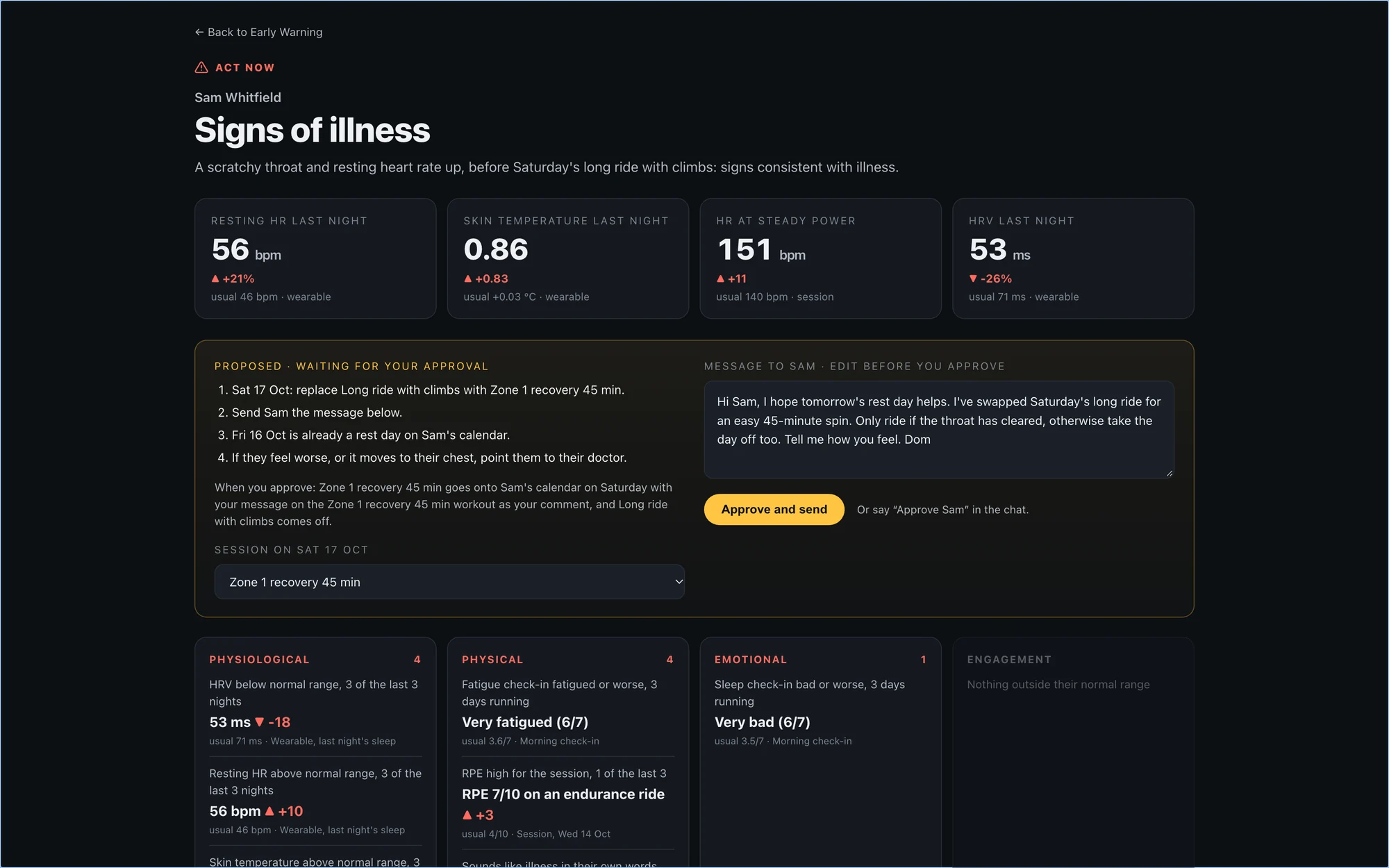
Who needs you today is at the top: four athletes in Act now, two on the watch list, everyone else clear. Click into an athlete and the evidence sits beside their own words. Mark’s left-right balance had shifted on climbs and his cadence was dropping, while his comments went from niggle to tight to sore to sharp. Sam’s HRV was down, his resting heart rate and skin temperature were up, and after his last ride he wrote that his throat was scratchy.
A good way to start is the schedule. Once the rules are right, build the tool.
Step 5: Keep the Human in the Loop
This is the part that matters most, and the easiest to get wrong. Design the approval as carefully as the analysis:
Nothing reaches an athlete or their plan until you approve.
You can change the proposal: a different session, your own words.
One athlete at a time. A workflow that can message your whole roster in one click can make the same mistake forty times.
You can undo it.
Sam had 3 x 12 minutes of threshold planned for Friday. The page proposed a rest day and drafted a message in the coach’s voice. I picked the rest day, approved it, and Vekta updated: the threshold session came off, and the rest day went in with the message. For the demo, it wrote to my own calendar.
The athlete hears from their coach. The work behind it took seconds.
Step 6: Give It a Memory
Most signals don’t need action today. They need watching. A workflow that only sees this morning will miss the trend, so give it a memory.
Ours keeps a private log for each athlete, every morning. Mark’s knee is why. Three weeks of words getting stronger, after a change of cleats, that no single morning would have shown.
The more of the athlete’s story lives in Vekta, the more a workflow can read. Paul-Antoine made the point on the night: comments after sessions, notes and check-ins are some of the richest signals you have. If they live in WhatsApp, the workflow never sees them.
On the night, the log went into Vekta as hidden notes that only the coach can see. In the Early Warning skill it stays on your computer by default, with a switch to save it to Vekta.
The whole workflow took about 45 minutes to put together.
Build your own workflows. Book a demo or start your 14-day free trial
Three Habits That Make It Easier
1. Plan before it builds. Ask it to interview you first, then approve the plan before anything is built. It raises the edge cases you hadn’t thought of, and it’s faster than fixing a build.
2. One chat per workflow. Each chat builds up memory of that workflow and how you coach, so every new workflow is faster to design. In Claude Code, give each project its own folder too. Claude saves the scripts it writes there, so when you come back two weeks later, everything is still in place. One for the weekly reports, one for race analysis, one for the end-of-season presentation.
3. Spend tokens on purpose. Each chat slows down as it fills. Pull only the athletes, dates and fields the job needs, and start a fresh chat for each new job. Then schedule the heavy pulls overnight. Some coaches with large rosters run them at 10pm, so the data is ready with their morning coffee and their full allowance is still there.
Why Build Your Own
We spend most of our days talking to coaches and athletes, and we always ask the same thing: what would your ideal screen be? Across hundreds of calls, no two answers have matched.
Yet for twenty years, coaches have worked from the same fifteen or twenty screens. Everyone read the same charts, from the same models, with the same view of the athlete. The only way off them was a team of analysts and the budget to pay for one. The playing field was level. It isn’t any more.
Now, an idea after a race or on a call with an athlete can be built that evening, in thirty or forty minutes. It works the way you coach, on your athletes, and nobody else has it.
And it doesn’t stand still. Use it for a week, then refine it. Add the signal you missed, change a rule, take it somewhere new. Each version carries more of your method, until you have something that has never existed before.
That is your advantage. Your athletes get a service built around them, not around a screen everyone shares. Your coaching offers something others can’t.
Start With This One
The workflow from the night is now a Vekta Skill: Early Warning. It interviews you with the same three questions, with my answers ready as defaults. Keep them, change any part, or give your own. It runs on your own API key, builds the same page, and lets you choose the session, edit the message, approve or undo, one athlete at a time.
Want to see it first? Try the example on the same 20 simulated athletes. Open an athlete, change the session, edit the message and approve. It shows exactly what would be written, and writes nothing.
What Comes Next
Webinar 1 covered getting set up. Webinar 2 covered workflows. Webinar 3 is about your stack: bringing the Vekta API together with the tools you already use, from call recorders like Gemini and Granola to race data and weather models, and building new services for your athletes and your business. Date to follow.
Start with the skills at joinvekta.com/skills, catch up on webinar 1 in Vekta API Live, and if you want a hand getting set up, book a call with the team.
On Thursday 15 October we ran the second Vekta API Live, this time for coaches. The first session showed what the API can do. This one was about how to make it work for you, every day, the way you coach.
The answer is a workflow. Most coaches who use AI ask it questions, and some have built a tool or two. A workflow is different. It’s your method, written down clearly enough that AI can run it for you, on every athlete, every morning, and stop wherever your judgement is needed.
This write-up is for coaches who want to build their own. It takes you through the method step by step, using the workflow we built live as the example. The full session and the slides are below if you’d rather watch.
Want access to the Vekta API? Request your key or start your 14-day free trial
Jump to a Section
00:00 - Welcome
01:25 - You can do things AI will never do
03:11 - An automated workflow, in five parts
04:41 - How Vekta runs on workflows
07:44 - Two questions about your week
08:15 - Every workflow starts with a prompt
11:58 - Building one workflow, live
15:33 - The interview
22:15 - The plan, in five parts
23:25 - Two ways to run it
25:11 - The Early Warning page
32:25 - Three tips
36:17 - Every coach wants a different screen
37:44 - What comes next
Every slide from the session. Use the arrows, swipe on a phone, or open it full screen.
Why Workflows
We opened with a line most coaches recognise: “I know what every athlete needs from me. I don’t have the hours to give it to all of them.” A file goes unread. A warning sign is caught too late. A plan isn’t adjusted in time. Each time, an athlete’s performance pays for it.
AI can help with that, but how you use it matters. Asking a question helps once. You ask, it answers, and tomorrow you start again. Building a tool helps more, but a tool still waits for you to open it. A workflow does the work before you ask. It starts on its own, pulls the data, applies your rules and brings you only the decisions that need you.
For a coach, that changes three things:
Consistency. Your method is applied to every athlete, every day, including the ones you would have reached on Thursday.
Time. The reading, sorting and drafting is done before you sit down. Your hours go on the athletes.
Scale. Ten athletes or seventy, the workflow reads them all the same way.
What Only You Can Do
None of this replaces the coach. Some of the work is yours alone: understanding the athlete, the conversation and the trust, the judgement that comes from your knowledge, your expertise and your methodology, and deciding what happens next.
The rest, AI can do in a fraction of the time. Vekta already aggregates every ride from every athlete, rebuilds each athlete’s CP, W′ and zones from their riding, and learns their baselines. Through the API, an assistant can read every comment, note and check-in your athletes write, and write back into Vekta across your whole roster. A good workflow is designed around that line. The machine does the volume. The final call stays yours.
The Five Parts of a Workflow
Every workflow, in any business, has the same five parts. Know them, and you can design one before you open a chat.
1. The trigger. What starts it. A time, like every morning at 9 or every Monday. An event, like a ride uploading, a race file arriving or a new athlete joining your workspace. Or you, asking. The question to answer: when does this need to happen to be useful? A morning briefing is no use at lunchtime.
2. The data. What it pulls in. Through the API, that’s everything Vekta holds: every ride down to the second, CP, W′ and zones, Load and Strain, sleep, HRV and resting heart rate from wearables, morning check-ins, RPE and feel, the comments athletes write, planned sessions, notes and events. The question: what do you actually read when you do this job by hand? Pull that, and only that.
3. The rules. What it applies. This is your methodology. Against what baseline? How far from normal counts? What gets escalated, and what just gets noted? If you don’t set the rules, the AI fills the gaps with its own assumptions, and its assumptions aren’t yours.
4. Human in the loop. Where a person applies judgement, knowledge or expertise, or approves the action. The question: what can it do on its own, and what must wait for you? A briefing can arrive unchecked. A message to an athlete, or a change to their plan, should wait for your yes.
5. The action. What it does at the end. A briefing, a report, a dashboard, a drafted message, a session swapped in the plan. The question: what form is most useful at the moment you act on it?
For a coach, the repeat work runs on its own. Your hours go on the work only you can do.
Workflows in Practice
We run much of Vekta on workflows. Paul-Antoine showed three. Our weekly changelog drafts itself from the tickets the dev team completed, and is published everywhere once someone approves it. Support requests are grouped and ranked by how often they come up, and the team sets the priority. When a new coach signs up, an agent researches their business and Samuel gets a briefing and a draft welcome to make his own.
Three different jobs with the same shape. AI does the reading, sorting and drafting, and a person makes the call before anything goes out.
The same shape fits coaching jobs you already do. A few examples, each already in Vekta Skills:
The job | Trigger | Data | Rules | You | Action |
Every morning | Every athlete’s recovery and training against their own baseline | What counts as a flag for you | You decide who to call | Your roster, ranked by who needs you first | |
Every morning | Yesterday’s sessions, and the comments you’ve written before | Your tone, learned from your own comments | You edit, and choose what’s sent | Comments posted on the sessions you approve | |
After a race | The race against the athlete’s own record | What you look for in this kind of race | You read it before the athlete does | A debrief of where the race turned | |
A new athlete joins | Their whole history, every season and race | What you assess first | You review the strengths and limiters | An assessment to take into your first call |
Find Your First Workflow
Before you open a chat, answer two questions. What’s taking your time but offers little to no value, to you or your athletes? And where is your value best spent?
The first list is where your workflows come from. The second is where the hours they give back should go.
Good first workflows have four things in common:
They repeat, daily or weekly.
They take time but little judgement: reading, sorting, drafting.
You already know your rules, even if you’ve never written them down.
They end in something you act on: a list, a message, a change.
Start with one. Get it right, then build the next.
Step 1: Write the Prompt
The blank chat is the hardest part. There are two ways in: start from the problem you want to solve, or start from the end goal and work backwards.
Then talk, don’t type. Put your headphones in and speak to it. Five minutes of talking gets you where twenty minutes of typing would, because you give far more detail when you speak. As Paul-Antoine put it on the night, one sentence won’t get you a clean result.
A good opening covers four things:
The problem, in your words. Who it affects, and what it costs.
Your context. Your athletes, how you coach, the data it should use.
What done looks like. What you see each morning, and what waits for your approval.
Interview, then plan. Ask it to interview you on anything you haven’t covered, then to show you the plan before it builds.
Here’s the prompt from the night. The problem was one most coaches know: the early signs of illness, overreaching, injury and stress are spread across too much data to read every morning.
This is the problem I want to solve. I coach 20 athletes. The early markers of illness, overreaching, injury and psychological stress are spread across their physiological data and what they tell me, and I can't review all of it every morning. So I tend to find problems late, once they've already cost the athlete training time. I want to catch them early, before they escalate.

How I coach: I read each athlete's physiology against their own baseline, alongside their feedback after sessions and in their daily check-ins, and how engaged they are with their training.

What done looks like: at 9 a.m. every morning, I see who needs me first and why. Nothing in an athlete's plan changes until I approve it.

Interview me on anything I haven't covered, then show me the plan before you build.
Read it against the four parts:
“This is the problem I want to solve…” The problem, who it affects (20 athletes) and what it costs (training time).
“How I coach…” The context, in one sentence.
“What done looks like…” The output, and the human in the loop, decided before anything is built.
“Interview me…” The line that does the most work.
The prompt is the problem. Start with yours.
Step 2: Let It Interview You
No prompt covers everything. The interview is how the AI finds what’s missing, and how your methodology becomes rules it can follow. It will also raise edge cases you hadn’t thought of.
The three questions it asked map straight onto the five parts:
“What should I look at for each athlete?” The data.
“When should something come to you, rather than just being logged?” The rules.
“When it does, what should I prepare for you?” The action, and where you sit in the loop.
Answer them the way you’d explain your method to a new assistant coach. These were the answers on the night.
What to look at. Four layers, each against the athlete’s own last 28 days. The keywords are where experience counts most: the words your athletes use when something is starting to go wrong.
Four things, always against their own last 28 days.

1. THEIR PHYSIOLOGY
- HRV, resting heart rate, skin temperature and sleep from their wearable
- Load and strain
- Heart rate against power, and whether intervals hit target
- CP, W′ and durability after 20 kJ per kilo
- Weight
- How they pedal: left-right balance and cadence on climbs

2. HOW THEIR BODY FEELS
- Check their morning wellness check-ins for fatigue and soreness
- Scan RPE and feeling after every session
- Read the comments they write after their sessions, and track keywords:
   - any part of the body they keep mentioning
   - which side, on or off the bike, after how long, on climbs or the flat
   - after any change of shoes, cleats, saddle or position
   - the words getting stronger: niggle → tight → sore → sharp
   - anything that sounds like illness, overreaching or under-fuelling

3. HOW THEY'RE FEELING IN THEMSELVES
- Check stress and sleep in the morning check-in
- Track keywords in their comments and notes:
   - "want to" turning into "have to"
   - always and never
   - fixating on the numbers, comparing themselves to others
   - worrying about letting me down
   - confidence dropping, exhaustion, pulling away from the group

4. HOW THEY'RE ENGAGING
- Missed sessions and late uploads
- Check-ins stopping
- Comments getting shorter, RPE left blank
- Training late at night, doing the bare minimum
- Nothing planned after a goal event, and no talk of what's next
When it comes to you. Three levels: logged, watched and escalated. Two hard flags skip the queue. Then a clear line on what counts as a signal at all.
- One signal on its own: log it in their private log, so I can see if it builds.
- Two of the four areas, or one that keeps getting worse: my watch list.
- Three or more at once: straight to me.

- Also straight to me: signs of illness before a hard session, and pain that's turned sharp.

- Physiology counts after two nights outside their normal range.
- Check-ins count when they say fatigued, sore, anxious or slept badly, or worse, three days running, or when it's getting worse each day.
What to prepare. Different problems get different actions, and nothing reaches an athlete without the coach.
- Illness or overreaching before a hard session: swap it for an easy session from my library, or replace it with a rest day, depending on the signal. Hidden until I approve, with a comment in my voice.

- An injury building: ask the athlete for more detail on it, then prepare the next steps for me, which could include a physio. Swap any session that would make it worse, hidden until I approve.

- Fuelling, stress or motivation: leave the plan alone, and draft a message inviting them to talk.
On the night I asked for hidden drafts. The Early Warning skill goes a step further: nothing is written to Vekta at all until you approve.
Step 3: Check the Plan Before It Builds
Before building anything, it should play the plan back to you in the five parts. Read it the way you’d read a contract:
Trigger. Does it run when you need it?
Data. Is anything missing, or pulled in that you don’t need?
Rules. Are they yours, word for word? Ask it to list anything it decided for you. When we tested this workflow on a real roster, the AI set thresholds of its own wherever the rules left a gap.
Human in the loop. Is it clear what waits for you?
Action. Will it produce the thing you’ll act on?
Change it here. It costs nothing now, and much more once it’s built. Paul-Antoine’s point on the night: agreeing the plan first is faster than building, changing and building again.
On the night, the plan came back as a 9am trigger, each of the 20 athletes against their own last 28 days, the rules as given, the coach approving everything that reaches an athlete, and one action each for illness, injury, fuelling, stress and motivation.
Step 4: Choose How It Runs
There are two ways to run a workflow, and most coaches will use both.
As a schedule. One sentence turns it into a task that runs every morning at 9 and leaves a briefing in the chat: who needs you first, why, and what it proposes. Use this when the output is a short read.
As a tool. Ask it to build the workflow into a page you work from. Use this when you need to compare athletes, see the evidence and act from it. Our Early Warning page took about fifteen minutes to build once the plan was agreed.
Who needs you today is at the top: four athletes in Act now, two on the watch list, everyone else clear. Click into an athlete and the evidence sits beside their own words. Mark’s left-right balance had shifted on climbs and his cadence was dropping, while his comments went from niggle to tight to sore to sharp. Sam’s HRV was down, his resting heart rate and skin temperature were up, and after his last ride he wrote that his throat was scratchy.
A good way to start is the schedule. Once the rules are right, build the tool.
Step 5: Keep the Human in the Loop
This is the part that matters most, and the easiest to get wrong. Design the approval as carefully as the analysis:
Nothing reaches an athlete or their plan until you approve.
You can change the proposal: a different session, your own words.
One athlete at a time. A workflow that can message your whole roster in one click can make the same mistake forty times.
You can undo it.
Sam had 3 x 12 minutes of threshold planned for Friday. The page proposed a rest day and drafted a message in the coach’s voice. I picked the rest day, approved it, and Vekta updated: the threshold session came off, and the rest day went in with the message. For the demo, it wrote to my own calendar.
The athlete hears from their coach. The work behind it took seconds.
Step 6: Give It a Memory
Most signals don’t need action today. They need watching. A workflow that only sees this morning will miss the trend, so give it a memory.
Ours keeps a private log for each athlete, every morning. Mark’s knee is why. Three weeks of words getting stronger, after a change of cleats, that no single morning would have shown.
The more of the athlete’s story lives in Vekta, the more a workflow can read. Paul-Antoine made the point on the night: comments after sessions, notes and check-ins are some of the richest signals you have. If they live in WhatsApp, the workflow never sees them.
On the night, the log went into Vekta as hidden notes that only the coach can see. In the Early Warning skill it stays on your computer by default, with a switch to save it to Vekta.
The whole workflow took about 45 minutes to put together.
Build your own workflows. Book a demo or start your 14-day free trial
Three Habits That Make It Easier
1. Plan before it builds. Ask it to interview you first, then approve the plan before anything is built. It raises the edge cases you hadn’t thought of, and it’s faster than fixing a build.
2. One chat per workflow. Each chat builds up memory of that workflow and how you coach, so every new workflow is faster to design. In Claude Code, give each project its own folder too. Claude saves the scripts it writes there, so when you come back two weeks later, everything is still in place. One for the weekly reports, one for race analysis, one for the end-of-season presentation.
3. Spend tokens on purpose. Each chat slows down as it fills. Pull only the athletes, dates and fields the job needs, and start a fresh chat for each new job. Then schedule the heavy pulls overnight. Some coaches with large rosters run them at 10pm, so the data is ready with their morning coffee and their full allowance is still there.
Why Build Your Own
We spend most of our days talking to coaches and athletes, and we always ask the same thing: what would your ideal screen be? Across hundreds of calls, no two answers have matched.
Yet for twenty years, coaches have worked from the same fifteen or twenty screens. Everyone read the same charts, from the same models, with the same view of the athlete. The only way off them was a team of analysts and the budget to pay for one. The playing field was level. It isn’t any more.
Now, an idea after a race or on a call with an athlete can be built that evening, in thirty or forty minutes. It works the way you coach, on your athletes, and nobody else has it.
And it doesn’t stand still. Use it for a week, then refine it. Add the signal you missed, change a rule, take it somewhere new. Each version carries more of your method, until you have something that has never existed before.
That is your advantage. Your athletes get a service built around them, not around a screen everyone shares. Your coaching offers something others can’t.
Start With This One
The workflow from the night is now a Vekta Skill: Early Warning. It interviews you with the same three questions, with my answers ready as defaults. Keep them, change any part, or give your own. It runs on your own API key, builds the same page, and lets you choose the session, edit the message, approve or undo, one athlete at a time.
Want to see it first? Try the example on the same 20 simulated athletes. Open an athlete, change the session, edit the message and approve. It shows exactly what would be written, and writes nothing.
What Comes Next
Webinar 1 covered getting set up. Webinar 2 covered workflows. Webinar 3 is about your stack: bringing the Vekta API together with the tools you already use, from call recorders like Gemini and Granola to race data and weather models, and building new services for your athletes and your business. Date to follow.
Start with the skills at joinvekta.com/skills, catch up on webinar 1 in Vekta API Live, and if you want a hand getting set up, book a call with the team.
Try Vekta free
Put the theory to work
Vekta is where coaches and athletes plan the work, see the numbers, and track what actually changes.
Try Vekta free
Put the theory to work
Vekta is where coaches and athletes plan the work, see the numbers, and track what actually changes.
Frequently asked questions
Frequently asked questions
Brand Director