Platform Updates
Platform Updates
Platform Updates
7
7
7
min
min
min
Dominic Valerio
Dominic Valerio
Vekta API Live: A Performance Department, Built in 30min
Vekta API Live: A Performance Department, Built in 30min
The full recording of our first live session on the Vekta API. One key, one assistant, and the tools a WorldTour performance department runs on, built on screen.
On Wednesday 30 September, more than a hundred coaches and athletes signed up to watch the Vekta API go to work. Live, with nothing pre-recorded. A Vekta workspace, a key and an AI assistant, with Paul-Antoine Girard, Samuel Souci and me on the call.
In forty-five minutes we went from connecting a key to a working performance department. Questions answered in seconds. A roster ranked by who needs attention first. A coach dashboard built from one prompt while we kept talking. A planned-versus-performed check set to run every morning at nine. And session comments for an entire roster, drafted in the coach's own voice, with the approved one written straight back into Vekta.
If you missed it, or want to rebuild it step by step, the full session is below.
Want access to the Vekta API? Request your key or start your 14-day free trial
Jump to a Section
00:00 - Welcome
01:15 - Why we built the Vekta API
02:30 - API and MCP: which does what
03:55 - What the API reads and writes today, and what's coming
07:25 - Connecting Vekta to Claude
10:45 - Asking your data a question
13:05 - Building the Coach Command Centre
14:10 - Turning a report into a daily schedule
17:30 - Writing back: comments in your voice
21:10 - Training Response Report and Race Day Simulator
23:50 - Vekta Skills
25:00 - Your questions
Why We Opened It Up
Vekta spends a lot of time making sure training data is clean, then computes the layer that matters on top of it: power, Vekta Volume and Intensity, Load, and a physiology that updates with every ride. The idea behind the API was simple. Give all of it to the people who use the platform, build in the open, and let coaches and athletes build whatever they want on top.
The API is included with every Vekta subscription. No separate charge. No plan tier.
Start by Asking
Setup took a few minutes. One prompt into Claude Code, the key entered in the terminal and never in the chat, then a pull of the last seven days to confirm the connection.
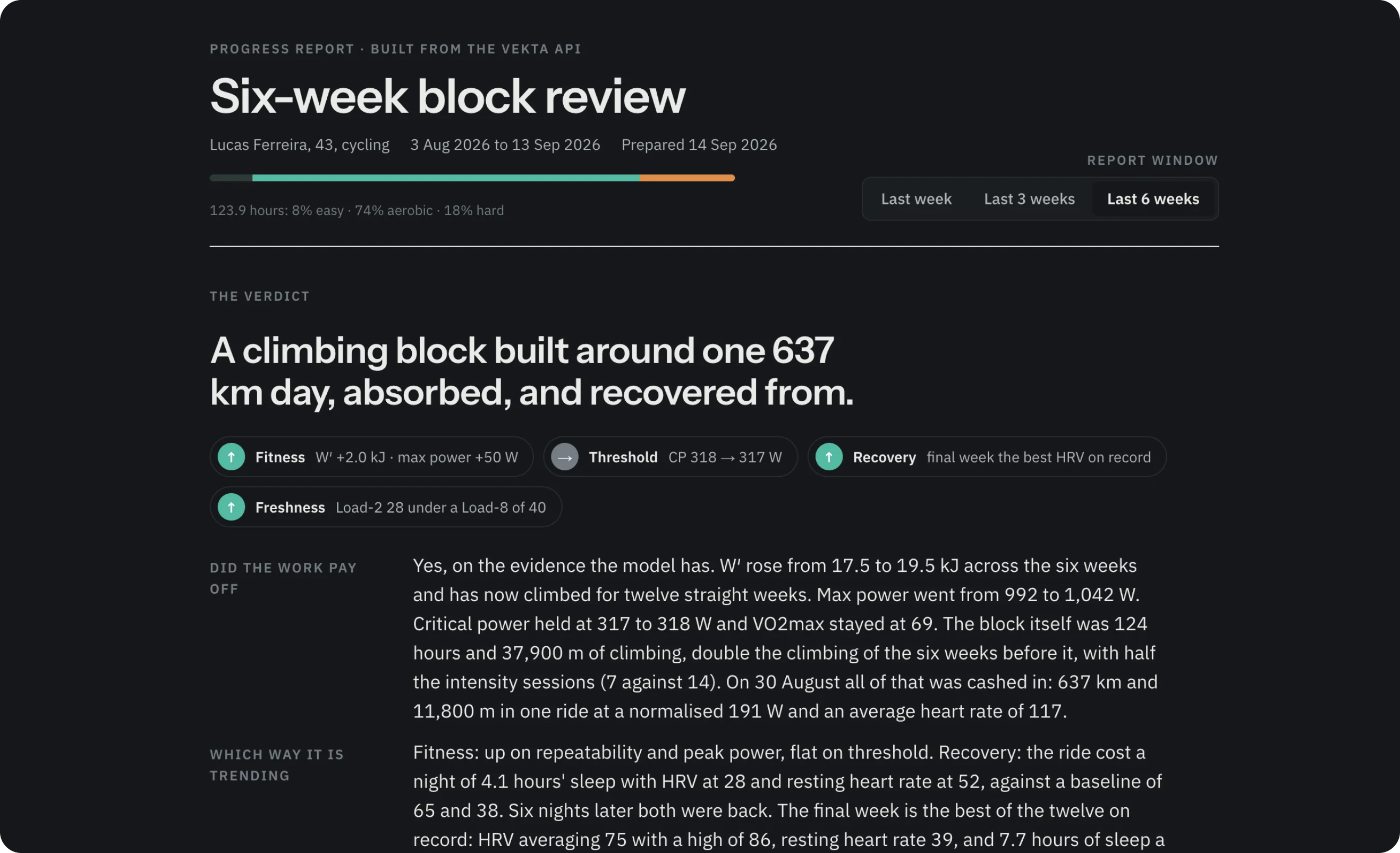
The first question: track my Critical Power and W′ over eight weeks, show where they changed, which training most likely drove each change, and keep what the data shows separate from interpretation. The answer came back in seconds, with the modelling and the reasoning laid out apart.
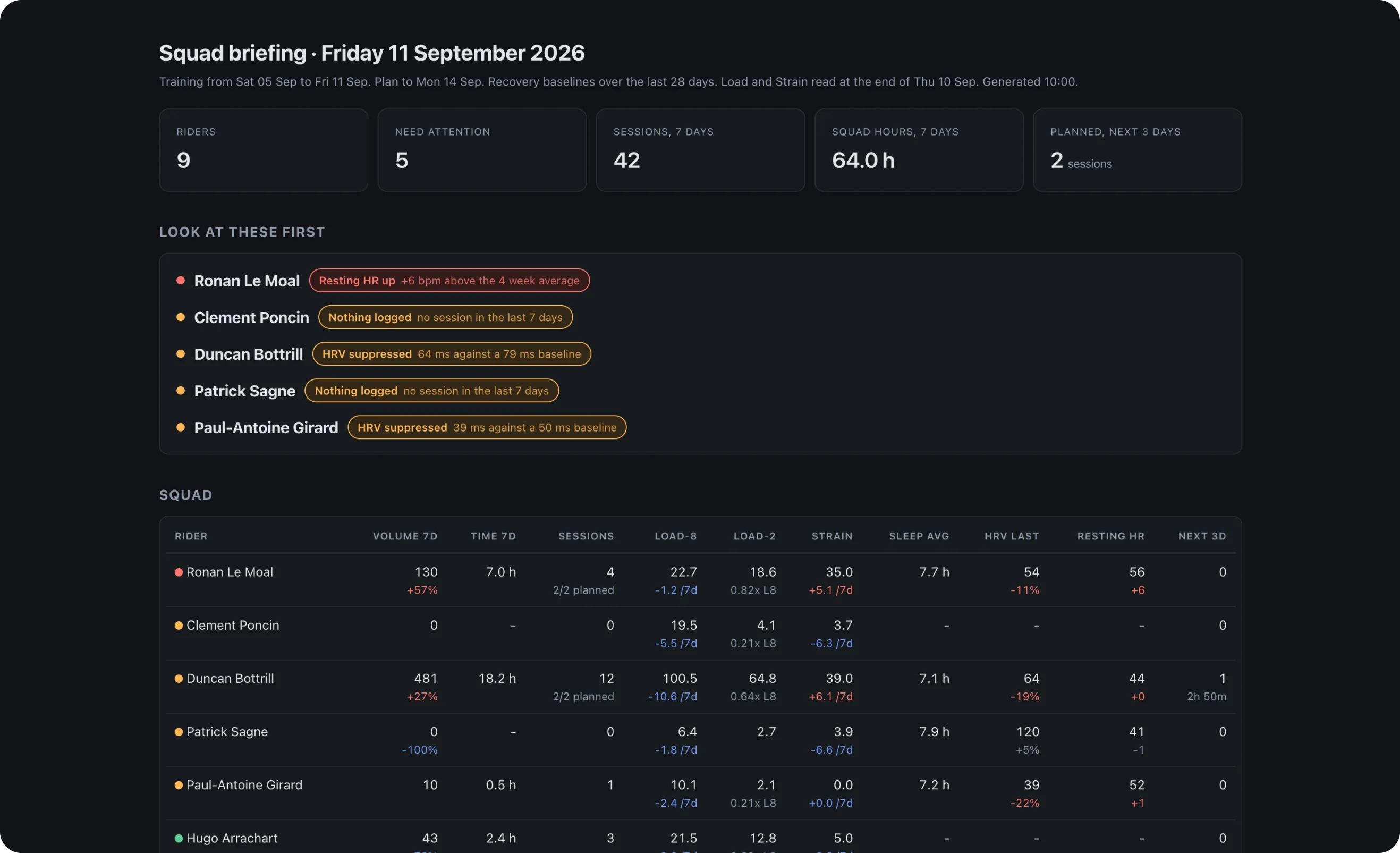
Then the roster. Nine athletes, the last seven days against the seven before, across training time, Vekta Volume, Intensity, plan completion and recovery. Ranked by who needs attention first. Ten athletes or seventy, the question is the same length.
Asking your data a question is becoming standard. Other platforms already offer it, and soon you'll do it inside Vekta too, and more. What the API adds is the ability to build: your own tools, on your own schedule, shaped around how you coach.
Then Ask It to Build
Coach Command Centre. Every athlete in the workspace on one page. Volume, sessions, Load, Strain, recovery and wellness markers, with anything outside an athlete's baseline flagged. It comes from a single prompt, and took three to four minutes to build while the demo carried on.
Planned against ridden. While the dashboard built, a second agent ran in parallel. Every session planned in the last seven days compared with what was actually ridden: completed, modified or missed, each interval checked against its power target, flags for slipping compliance and power fading across repetitions. One line per athlete.
Scheduled. Then one sentence: turn this into a schedule and run it every morning at 9:00. It sits in your assistant, runs on its own, and keeps a record of every day's review. Daily, weekly, whatever time suits how you work.
Write back. New this week, the API writes into Vekta as well as reading from it. We built an agent that runs every morning at 8:00. It reads the comments a coach has written in the past to learn their tone, pulls every session from the day before, and drafts a comment for each athlete. You edit in a batch and choose what gets sent. Nothing reaches an athlete until the coach approves it. The athlete hears from their coach. The work behind it took seconds.
Two more. We closed the demo with two tools made since launch. The Training Response Report reads any window you choose, from seven days to a twelve-week block, and tells you how an athlete is responding. The Race Day Simulator takes a GPX file, in this case the Marmotte Gran Fondo, reads the last eight weeks of an athlete's data, categorises every climb and estimates average power and finishing time. You can adjust the effort on each climb, and it accounts for the kilojoules per kilo building through the day.
Build your own performance department. Book a demo or start your 14-day free trial
API and MCP: Not One or the Other
The API runs on code, mostly Python, which your assistant writes for you. That makes it precise and repeatable. A dashboard built as code runs the same computation every time, without an AI run behind it.
The Vekta MCP server arrives in late October or early November. It connects Claude and ChatGPT directly to Vekta with no code and no setup, which makes it the quick way to ask a question. It works through language alone, so it is less suited to tools that need to be identical every morning, and it uses far more tokens.
The API is for building. MCP is for asking. Most coaches will want both.
What It Reads, What It Writes, What Comes Next
Today the API reads sessions, per-second telemetry, daily physiology, prescriptions, sleep, notes and events, for you and every athlete you coach. It writes workouts from your library into the plan, notes, events and races, and session comments.
Six more endpoints are in development, shaped by what coaches have asked for. They include structured workout creation, adding, updating and deleting library sessions, webhooks that ping your system the moment a new file is processed, interval and zone data, and wellness check-ins.
Vekta Skills, Launched Live
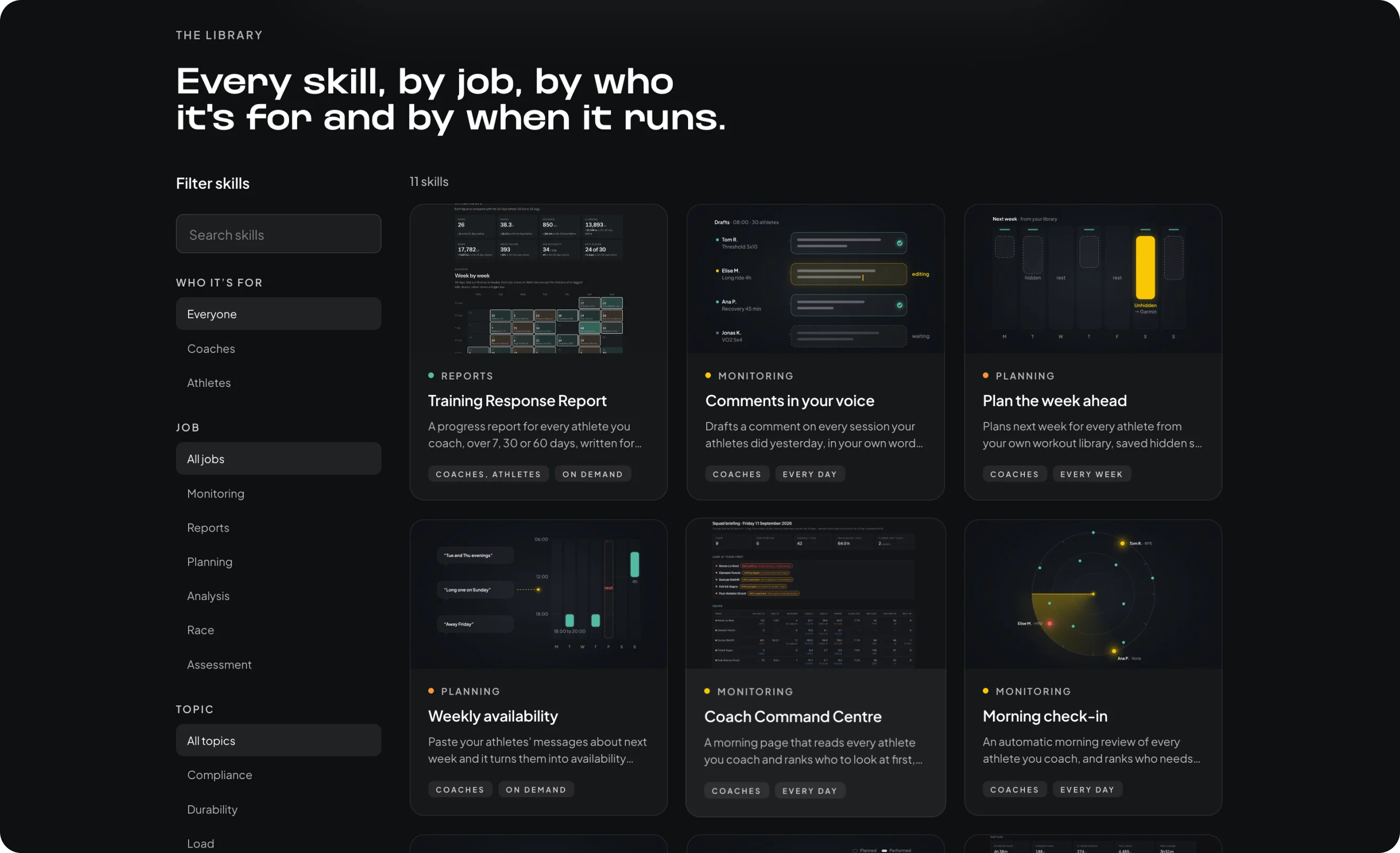
Every prompt used on the night is in the Vekta Skills library at joinvekta.com/skills, along with more. Eleven are live now, with close to thirty on the way. Filter by who it is for, the job you want done and when it runs. Copy the prompt into Claude Code or Codex, or download the skill file and call it with a slash command whenever you need it.
Each one is a starting point. Change what it tracks and how it reads your athletes. If you build something worth sharing, we want to see it.
What Comes Next
This was the first session in a series. Within the next two weeks we will run a session built around coaching workflows: onboarding new athletes, daily reviews and scaling a practice. After that, a session for those who want to go further, building with the API alongside other platforms and data sources.
The best tools on this API will not come from us. They will come from coaches who know exactly what they have always wished existed.
Start with the skills at joinvekta.com/skills, read how it all works in Introducing the Vekta API, and if you want a hand getting set up, book a call with the team.
On Wednesday 30 September, more than a hundred coaches and athletes signed up to watch the Vekta API go to work. Live, with nothing pre-recorded. A Vekta workspace, a key and an AI assistant, with Paul-Antoine Girard, Samuel Souci and me on the call.
In forty-five minutes we went from connecting a key to a working performance department. Questions answered in seconds. A roster ranked by who needs attention first. A coach dashboard built from one prompt while we kept talking. A planned-versus-performed check set to run every morning at nine. And session comments for an entire roster, drafted in the coach's own voice, with the approved one written straight back into Vekta.
If you missed it, or want to rebuild it step by step, the full session is below.
Want access to the Vekta API? Request your key or start your 14-day free trial
Jump to a Section
00:00 - Welcome
01:15 - Why we built the Vekta API
02:30 - API and MCP: which does what
03:55 - What the API reads and writes today, and what's coming
07:25 - Connecting Vekta to Claude
10:45 - Asking your data a question
13:05 - Building the Coach Command Centre
14:10 - Turning a report into a daily schedule
17:30 - Writing back: comments in your voice
21:10 - Training Response Report and Race Day Simulator
23:50 - Vekta Skills
25:00 - Your questions
Why We Opened It Up
Vekta spends a lot of time making sure training data is clean, then computes the layer that matters on top of it: power, Vekta Volume and Intensity, Load, and a physiology that updates with every ride. The idea behind the API was simple. Give all of it to the people who use the platform, build in the open, and let coaches and athletes build whatever they want on top.
The API is included with every Vekta subscription. No separate charge. No plan tier.
Start by Asking
Setup took a few minutes. One prompt into Claude Code, the key entered in the terminal and never in the chat, then a pull of the last seven days to confirm the connection.
The first question: track my Critical Power and W′ over eight weeks, show where they changed, which training most likely drove each change, and keep what the data shows separate from interpretation. The answer came back in seconds, with the modelling and the reasoning laid out apart.
Then the roster. Nine athletes, the last seven days against the seven before, across training time, Vekta Volume, Intensity, plan completion and recovery. Ranked by who needs attention first. Ten athletes or seventy, the question is the same length.
Asking your data a question is becoming standard. Other platforms already offer it, and soon you'll do it inside Vekta too, and more. What the API adds is the ability to build: your own tools, on your own schedule, shaped around how you coach.
Then Ask It to Build
Coach Command Centre. Every athlete in the workspace on one page. Volume, sessions, Load, Strain, recovery and wellness markers, with anything outside an athlete's baseline flagged. It comes from a single prompt, and took three to four minutes to build while the demo carried on.
Planned against ridden. While the dashboard built, a second agent ran in parallel. Every session planned in the last seven days compared with what was actually ridden: completed, modified or missed, each interval checked against its power target, flags for slipping compliance and power fading across repetitions. One line per athlete.
Scheduled. Then one sentence: turn this into a schedule and run it every morning at 9:00. It sits in your assistant, runs on its own, and keeps a record of every day's review. Daily, weekly, whatever time suits how you work.
Write back. New this week, the API writes into Vekta as well as reading from it. We built an agent that runs every morning at 8:00. It reads the comments a coach has written in the past to learn their tone, pulls every session from the day before, and drafts a comment for each athlete. You edit in a batch and choose what gets sent. Nothing reaches an athlete until the coach approves it. The athlete hears from their coach. The work behind it took seconds.
Two more. We closed the demo with two tools made since launch. The Training Response Report reads any window you choose, from seven days to a twelve-week block, and tells you how an athlete is responding. The Race Day Simulator takes a GPX file, in this case the Marmotte Gran Fondo, reads the last eight weeks of an athlete's data, categorises every climb and estimates average power and finishing time. You can adjust the effort on each climb, and it accounts for the kilojoules per kilo building through the day.
Build your own performance department. Book a demo or start your 14-day free trial
API and MCP: Not One or the Other
The API runs on code, mostly Python, which your assistant writes for you. That makes it precise and repeatable. A dashboard built as code runs the same computation every time, without an AI run behind it.
The Vekta MCP server arrives in late October or early November. It connects Claude and ChatGPT directly to Vekta with no code and no setup, which makes it the quick way to ask a question. It works through language alone, so it is less suited to tools that need to be identical every morning, and it uses far more tokens.
The API is for building. MCP is for asking. Most coaches will want both.
What It Reads, What It Writes, What Comes Next
Today the API reads sessions, per-second telemetry, daily physiology, prescriptions, sleep, notes and events, for you and every athlete you coach. It writes workouts from your library into the plan, notes, events and races, and session comments.
Six more endpoints are in development, shaped by what coaches have asked for. They include structured workout creation, adding, updating and deleting library sessions, webhooks that ping your system the moment a new file is processed, interval and zone data, and wellness check-ins.
Vekta Skills, Launched Live
Every prompt used on the night is in the Vekta Skills library at joinvekta.com/skills, along with more. Eleven are live now, with close to thirty on the way. Filter by who it is for, the job you want done and when it runs. Copy the prompt into Claude Code or Codex, or download the skill file and call it with a slash command whenever you need it.
Each one is a starting point. Change what it tracks and how it reads your athletes. If you build something worth sharing, we want to see it.
What Comes Next
This was the first session in a series. Within the next two weeks we will run a session built around coaching workflows: onboarding new athletes, daily reviews and scaling a practice. After that, a session for those who want to go further, building with the API alongside other platforms and data sources.
The best tools on this API will not come from us. They will come from coaches who know exactly what they have always wished existed.
Start with the skills at joinvekta.com/skills, read how it all works in Introducing the Vekta API, and if you want a hand getting set up, book a call with the team.

Try Vekta free
Put the theory to work
Vekta is where coaches and athletes plan the work, see the numbers, and track what actually changes.
Try Vekta free
Put the theory to work
Vekta is where coaches and athletes plan the work, see the numbers, and track what actually changes.
Frequently asked questions
Frequently asked questions

Brand Director